Last updated 2026-09-01
Suggested employees
Somebody registers with a work email, or types a company name into their profile. That person almost certainly belongs to a company already in the shared SoftInWay company directory — but nobody ever links the two. Suggested employees does the guessing for you: it shows a list of "this user probably works at that company" pairs, and you confirm the ones that look right.
The matching is done for you by the company directory service, not by OtiumWork — this page only lists the candidates and sends your picks back.
Where
Sidebar → Sales → Suggested employees
Open to admins, anyone in the Sales department, holders of the finance-access flag, and developer accounts.
If you see "The Company service integration is not configured", nothing is broken on your side — an admin needs to set up the connection under Ops → Integrations first.
What you're looking at
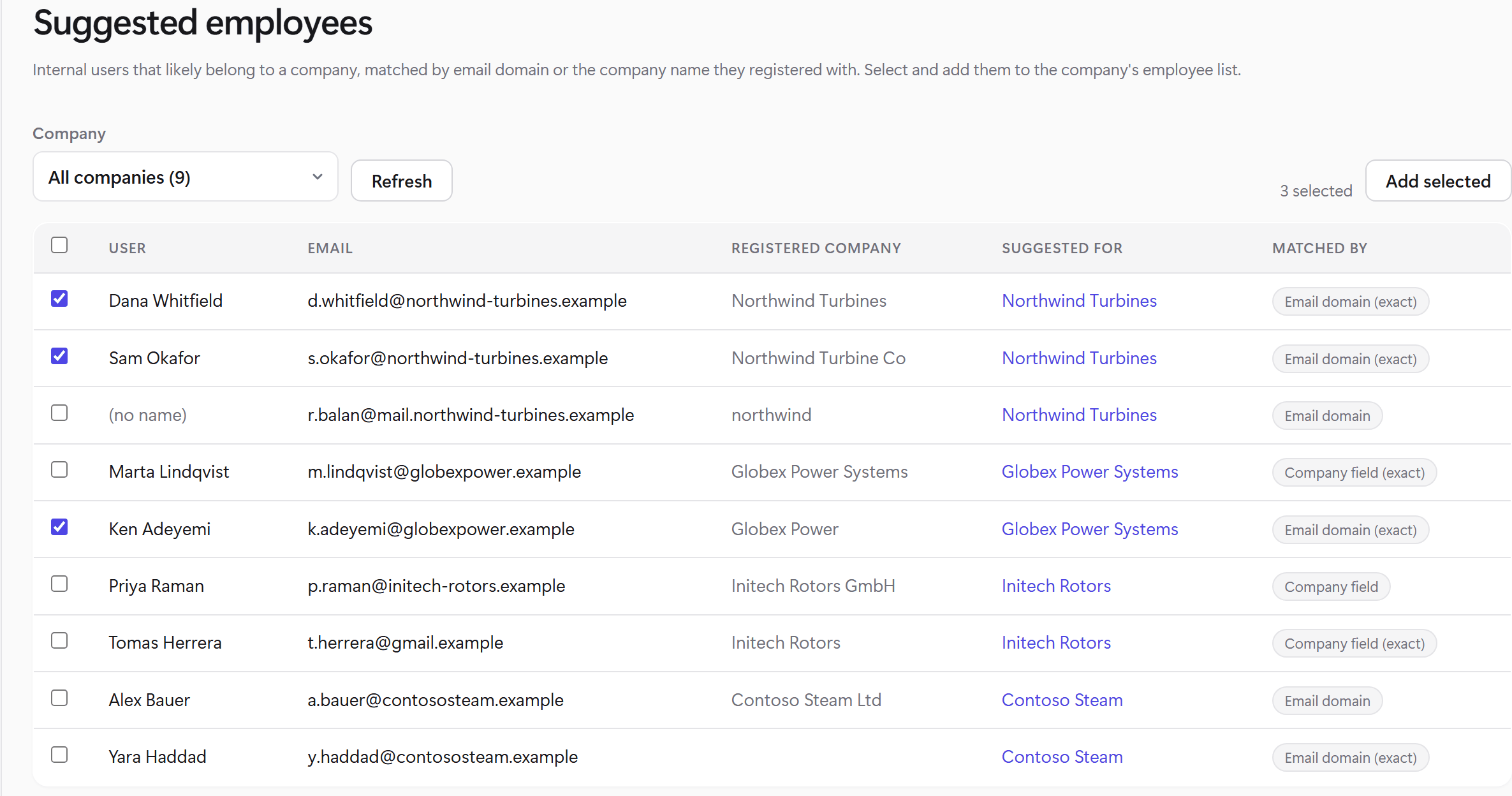
Click the picture to open it full size. The names and companies above are made-up examples.
One row per suggestion, 20 rows to a page:
- User — the person's name as the directory has it. Sometimes blank, which is normal; the email is the reliable part.
- Email — their login email.
- Registered company — the company name they typed when signing up. Free text, so expect typos, abbreviations and old employers.
- Suggested for — the company the service thinks they belong to. If that company also exists as a client in your OtiumWork, the name is a link to its client page (shown only if you have finance access, since that page shows money).
- Matched by — why the service thinks so. This is the column that tells you how much to trust the row:
| Badge | What it means |
|---|---|
| Email domain (exact) | Their email domain is exactly the company's domain. The strongest signal — usually just add it. |
| Email domain | The domain looks like the company's but isn't a character-for-character match. Worth a glance. |
| Company field (exact) | The company name they typed matches the company's name exactly. |
| Company field | The typed name is merely close to the company's name. The weakest signal — read the row before ticking it. |
Adding people
- Use the Company dropdown if you'd rather work one company at a time. It lists every company that has suggestions with the count next to each name, so you can start with the busiest.
- Tick the rows you're confident about. The checkbox in the table header selects everything on the current page only — with five pages of one company you tick through them page by page.
- The toolbar shows how many you've picked. Add selected sends them.
Your selection survives paging and filtering, so you can tick a few rows on page 1, jump to page 3, tick more, and add them all in one go. Refresh re-reads the list from the service and clears your selection.
What actually happens when you add
Each person is added to that company's Employees list in the shared company directory, with their account linked. If an employee with the same email is already on that list but not linked to any account, the account is simply attached to the existing entry instead of creating a duplicate.
Two things worth knowing before you tick:
- This writes to the shared directory, so everyone using it sees the result. There's no undo button on this page.
- Adding never edits or removes anybody — linking a person to a company is the only thing this page can do.
After you click Add
You get a short summary: how many went through, plus anything that didn't. Rows that succeeded disappear from the table — the list only ever shows work still to do. Rows that failed stay put so you can retry or ignore them. The usual reasons a row is refused:
- The user is already assigned to a different company in the directory.
- An employee with that email already exists on the list, linked to a different account. Someone needs to look at that company by hand.
- The company couldn't be read or saved right now — retry with Refresh, and tell an admin if it keeps happening.
See something wrong or outdated in this article? Report it →